
Clipping
Every clip your season needs, cut as the game runs
Point an SRT feed at Narrative and it cuts the key plays while the game is still on. The same engine assembles those clips into highlight packages and full game recaps, publish-ready before the whistle.
Live Moments
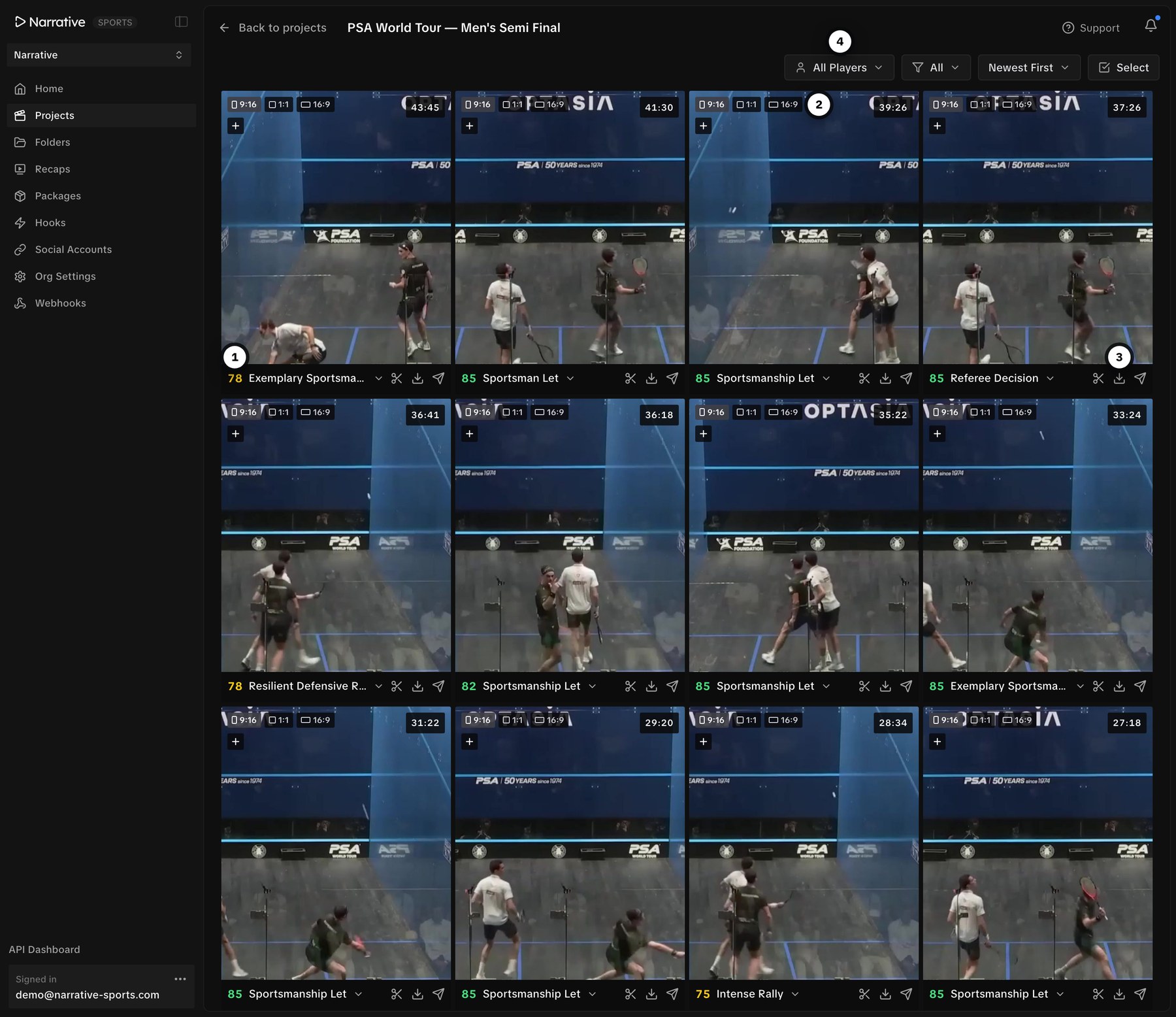
Moments land in your workspace while the game is still on.
Point an SRT feed at Narrative. Every rally, goal, and turnover is cut and scored as it happens, in under 10 seconds.
- 1
Scored the moment it lands
Every clip carries a virality score, so what is worth posting sits at the top of the grid instead of buried in the game.
- 2
Cut to every aspect ratio
9:16, 1:1, and 16:9 versions of each moment, ready for wherever it is going.
- 3
Trim, download, or post from the tile
Send a clip straight to your socials, hand it to an editor, or open it on the timeline.
- 4
Filter the game down to what you need
By player, by event type, or by what just came in.
Highlight Packages
Combine highlights from many games into one package.
Pick the games, choose the events and players you want, set a runtime. Narrative cuts the package.
- 1
Select any number of games
Build a top-10, a single player's reel, or a season-so-far from every match in your library.
- 2
Set the exact runtime
Ask for 2:15 and you get 2:15. Or give a range and the AI fits the best clips into it.
- 3
Say what you want in plain English
"Only the cleanest goals, no replays, no build-up."
- 4
Filter by event, team, or player
Goals, big chances, saves, and cards, for one team or one player.

Recaps
Turn a full game into a finished reel in under a minute.
Select the match, set the runtime, choose what to include. Narrative builds the reel.
- 1
One game in, one reel out
No clip-by-clip assembly. Select the match and hit create.
- 2
Exact runtime, every time
A 5:00 recap is exactly 5:00, so it fits the slot you have scheduled.
- 3
Choose what's included
Toggle player walk-on, kickoff, and final whistle.
- 4
Ready minutes after full time
Recaps sit beside your packages, one link away from going out.

Editor
Edit packages and recaps without downloading the whole game.
Every package opens as a finished multi-track edit, all clips cut and in order. Trim, reorder, add titles and audio, then export or post. No Premiere. No downloads.
- 1
All the game's clips on hand
Every tagged moment, ranked by virality score.
- 2
The package, already assembled
All the highlights cut and laid end to end, in order.
- 3
Full multi-track editing
Video, audio, titles, and graphics. Split, trim, reorder, detach audio.
- 4
Export or post from here
Any aspect ratio, or straight to YouTube, TikTok, Instagram, X.

By the numbers
More content, in a fraction of the time
See Narrative Clipping on your footage
Book a walkthrough and we will run it on a real game from your league.